
Public SSL/TLS certificates are moving to much shorter validity periods. Businesses that still rely on manual certificate renewals should begin preparing for a more automated approach.
By 2029, publicly trusted SSL/TLS certificates will have a maximum validity of 47 days. For businesses managing certificates manually, that means renewals will become a much more frequent operational responsibility.
BNC is helping customers prepare now by reviewing where certificates are used, how they’re currently renewed, and where automation may make sense.
This should be short and business-focused.
An expired certificate isn’t simply an IT inconvenience. Depending on where the certificate is used, expiration can result in:
The issue isn’t that certificates are going away. It’s that managing them manually becomes increasingly difficult when they need attention every few weeks instead of once a year.
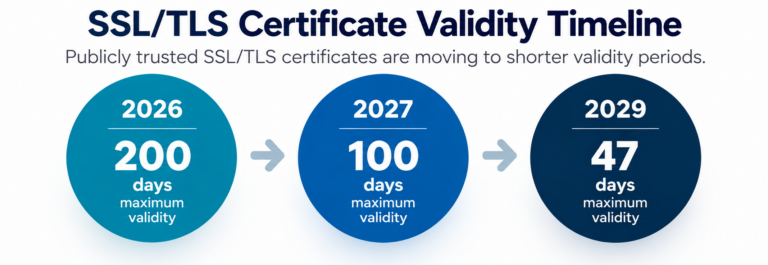
The maximum validity period for publicly trusted SSL/TLS certificates is being reduced in stages. The maximum is 200 days beginning in 2026, will decrease to 100 days in 2027 and ultimately to 47 days in 2029.
This means organizations will need to renew or replace affected certificates much more frequently than they have historically.
Shorter certificate lifespans are intended to improve security by reducing the amount of time that potentially compromised or outdated credentials can remain valid. They also allow changes in security requirements to take effect more quickly.
After March 15, 2026: 200-day maximum
After March 15, 2027: 100-day maximum
After March 15, 2029: 47-day maximum
No. The changes apply to publicly trusted TLS server certificates governed by CA/Browser Forum requirements. Private/internal certificates may be subject to different policies and lifecycles.
Depending on how the certificate is being used, an expired certificate can result in browser security warnings, inaccessible websites, failed connections, application or integration problems, and service interruptions.
It may become inaccessible to users or generate prominent security warnings that discourage users from proceeding. The exact impact depends on the system and how the certificate is being used.
Organizations should maintain an inventory of certificates, including where each certificate is installed, its expiration date, the issuing certificate authority, who is responsible for it and how it is currently renewed.
1. IDENTIFY
Know where publicly trusted SSL/TLS certificates are being used.
2. DOCUMENT
Know who is responsible for them and how they’re currently renewed.
3. AUTOMATE
Determine which certificates and systems can support automated renewal.
4. MONITOR
Verify that renewals are occurring successfully.
Then immediately:
BNC can help review your certificate environment, identify certificates that may require attention and evaluate where automated renewal makes sense.
Already a BNC customer?
Talk with your BNC engineer or IT Service Manager about your current certificate management process.
Not a BNC customer?